

A buyer fills out a form on a listing at 9pm. You do the right thing, plug them into your MLS auto-alert, and move on. Six weeks later they buy a house. With another agent. The portal alert you set up dutifully emailed them 40 times while it happened, and you never heard from them again.
The listing alert is not the problem. Sending a raw, unbranded, un-timed alert and calling it follow-up is the problem. A buyer who signs up for property alerts just told you they are shopping, which is the highest-intent signal you get. Most agents answer it with an email that looks like it came from a database, has no reply hook, and never mentions the agent by name. This post is the fix: a six-stage drip system that wraps your listing alerts in real follow-up, with the exact copy, the timing, the way each stage breaks, and the compliance you cannot skip.
Table of contents
- What ignored listing alerts cost you
- The six-stage system
- Stage 1: Segment before you send
- Stage 2: Build the saved search
- Stage 3: The first ten days
- Stage 4: Wrap every alert
- Stage 5: Score the behavior
- Stage 6: The win-back track
- Steal this: the message copy
- Run it for solo, team, and brokerage
- The compliance you cannot skip
- Objections
- Frequently asked questions
What ignored listing alerts actually cost you
Start with how buyers actually behave. They do not decide in a weekend. In the most recent NAR Profile of Home Buyers and Sellers, buyers searched for a median of 10 weeks and looked at around seven homes before they bought (NAR Profile of Home Buyers and Sellers). That is a long time to stay top of mind with an email that looks like spam.
The market makes that window more important. First-time buyers were 30% of existing-home sales in August 2026, and they sign up for alerts early and browse for months (NAR Existing-Home Sales). With the median existing-home price at $429,100 and sales running at a 3.98 million annual rate, down 2.0% from the month before in that same report, there are fewer deals to go around, so losing a lead you already captured is expensive.
Speed and persistence win these leads, and most agents have neither. Firms that contacted an online lead within the first hour were nearly seven times more likely to have a real conversation with a decision-maker than those that waited even an hour longer (Harvard Business Review). Persistence is just as brutal: roughly 80% of sales need five or more follow-ups, and close to half of salespeople never follow up once (Invesp). A listing alert that fires on autopilot with no human behind it fails both tests at once. This is a system problem, not a talent problem: build the follow-up once and it runs whether you are at a closing or asleep. Our speed-to-lead guide covers why response time decides these leads.
The six-stage listing alert drip system
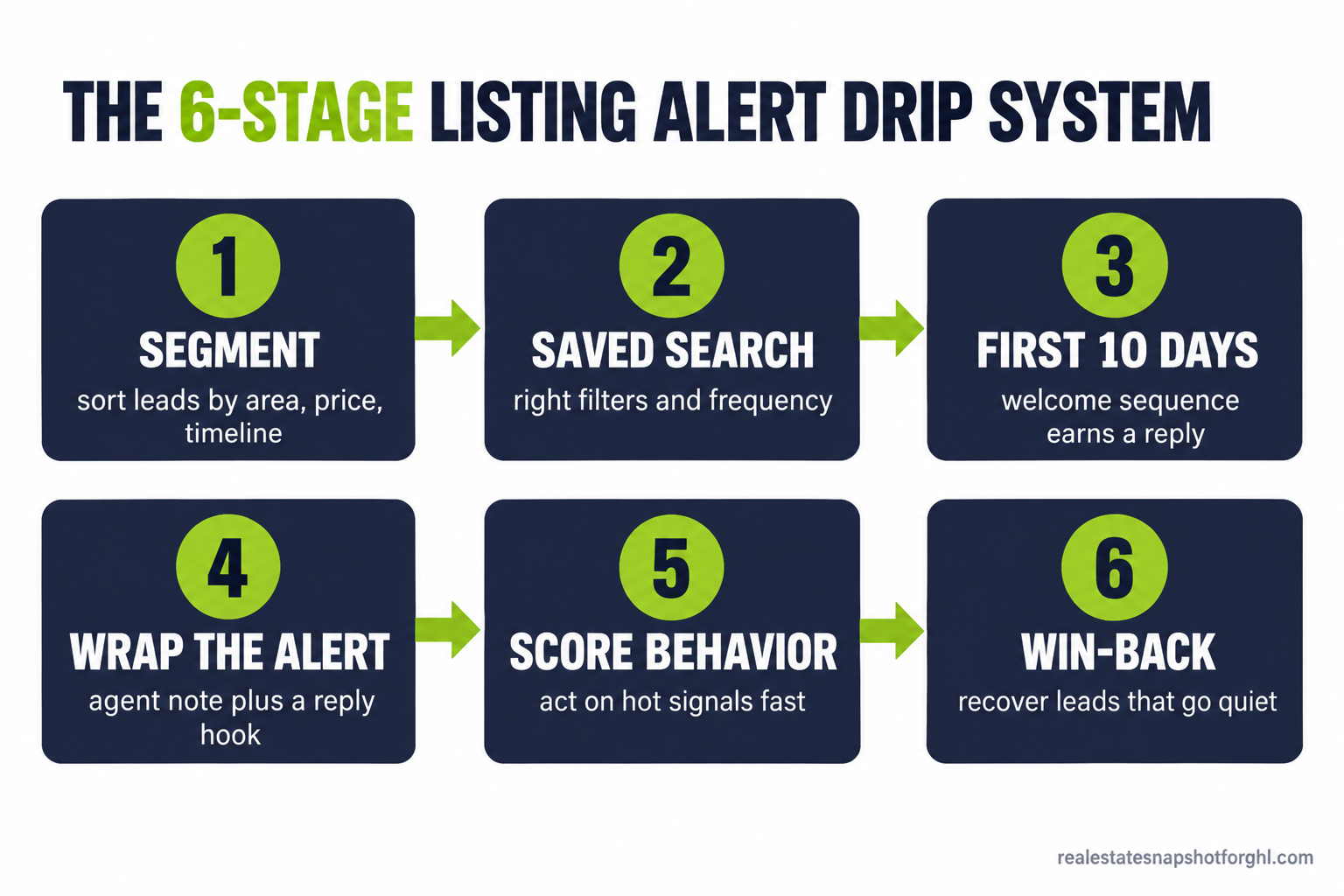
Every stage fixes one specific way alerts fail: segment so each alert is relevant, build the right saved search, run a welcome sequence that earns a reply, wrap every alert with agent context and a reply hook, score behavior and jump on hot signals, and win back leads that go quiet. Skip a stage and you land at the next one cold.
Source: Invesp sales follow-up research. Figures are general sales research, not real estate specific, but the gap between how many touches a sale needs and how few most people make is exactly what a system closes for you.
Stage 1: Segment before you send anything
The job: put each lead into a bucket so the alerts feel handpicked, not blasted.
The biggest reason alerts get ignored is that they are irrelevant. A first-time buyer looking at $300k condos does not want $900k listings, but on one giant list everyone gets everything and tunes out. Three fields do almost all the work: area (the neighborhoods they actually want), price band (a realistic range, not their dream number), and timeline (buying now, in a few months, or just watching). Most CRMs, including GoHighLevel and Follow Up Boss, let you tag a contact and route them into the right sequence automatically.
How it breaks: agents skip the timeline field, so a buyer who is 8 months out gets the same aggressive cadence as someone touring this weekend, and unsubscribes. Ask the timeline question in your first reply and tag on the answer. And sort by budget, area, and timeline only, never by anything the Fair Housing Act protects.
Stage 2: Build the saved search that matches real intent
The job: set up the alert so the listings that land are ones the buyer wants.
A good saved search is narrow enough to be useful and wide enough to keep flowing. Too tight, and it goes silent for weeks and the lead forgets you. Too loose, and every email is 30 listings they scroll past. Aim for a few relevant homes a week, and match frequency to timeline: a ready-now buyer can get daily alerts, a watcher six months out gets a weekly digest.
How it breaks: the search is built once and never touched again. The buyer’s price creeps up, they add a neighborhood, or rates shift their range, and relevance drops until they leave. Build a 30-day check into the sequence: a short message asking whether the search still fits, which also restarts the conversation. Our IDX lead capture guide covers setting the search up right at capture.
Stage 3: The first ten days
The job: turn a cold form-fill into a two-way conversation before the alerts even ramp up.
The first ten days decide whether this lead ever replies. If the buyer never connects the alert to a human, you are just another ignored inbox. Use a short welcome sequence: an instant text and email on signup, a value-add message on day two, a check-in on day four, and the search-fit question around day ten. Every message is short, sounds like you, and has one job: get a reply. The moment they reply, the automation pauses and hands off to you, and a missed-call text-back setup plugs the same gap on the phone.
How it breaks: the sequence keeps firing after the buyer already replied, so they get a chirpy automated “just checking in” the day after a real conversation with you, which undoes the trust you built. Every sequence here needs a reply-detection stop. If your tool cannot pause a sequence when a contact responds, fix that before you scale anything else.
Stage 4: Wrap every alert so it does not look like a robot
The job: make each alert feel like it came from you, with a reason to reply.
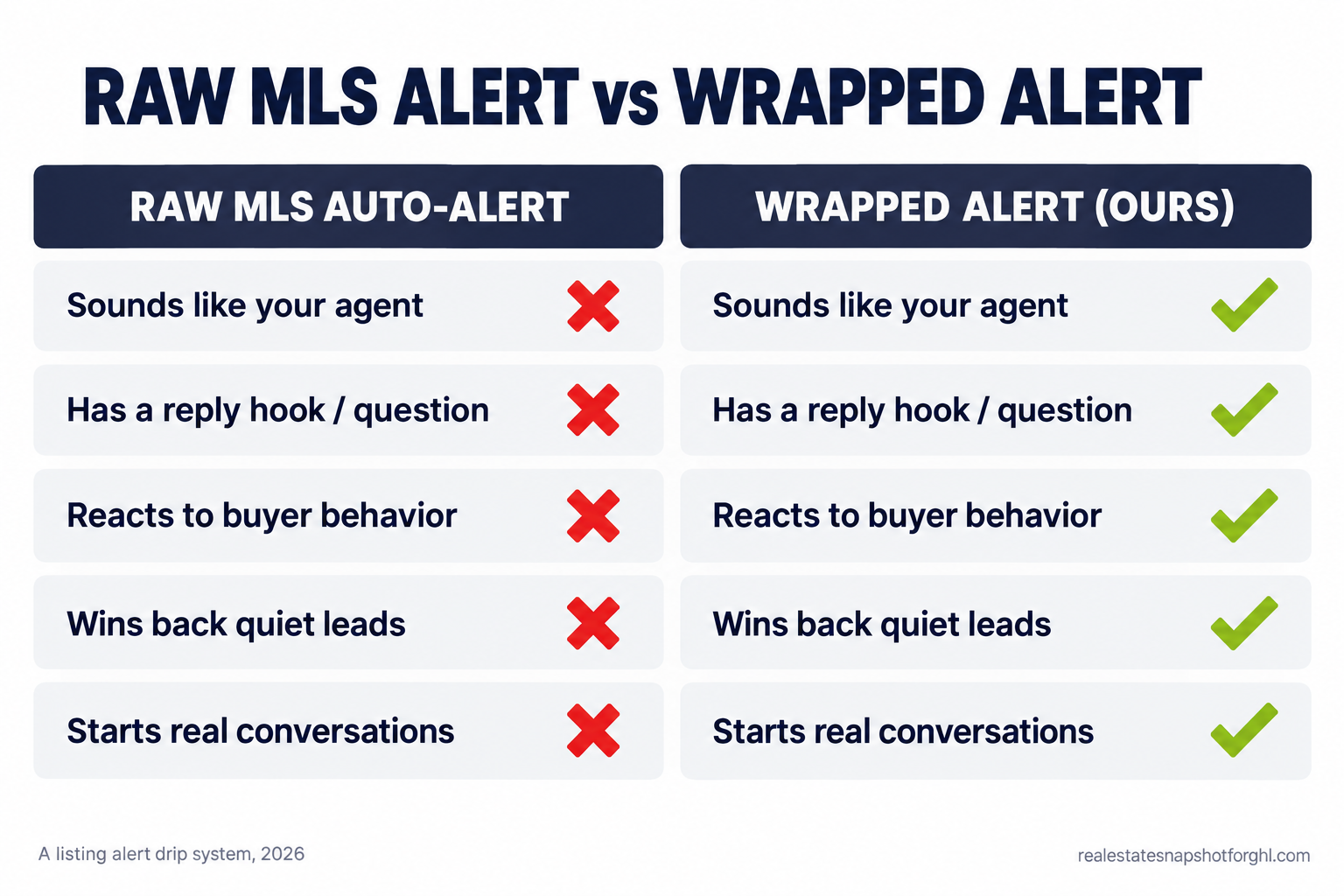
This is the stage almost everyone skips, and the one that prints money. The default MLS or portal alert is a wall of listings with no voice and no ask, so nobody replies. Wrapping means a short agent note at the top and a clear reply hook at the bottom: one or two lines on which listing you would look at first and why, then a real question like “want me to book a showing on the third one?” You turn a broadcast into a conversation, the light-touch nurture in our follow-up sequences guide.
How it breaks: the wrap is generic, so it reads as automated anyway. “Here are this week’s listings, let me know if you have questions” is filler, not a wrap. The note has to reference something specific in that batch, which means the automation pulls in real listing data. If your system cannot personalize the note, send fewer alerts with a genuine human line rather than more with a canned one.
Stage 5: Score the behavior and pounce on the hot signal
The job: watch what the lead does, and react to the strongest signals fast.
Behavior beats any calendar. A lead who opens the same listing three times, or clicks five homes in one evening, is closer to touring than one who has gotten weekly alerts for two months. Set simple triggers: repeated views of one listing, a click on “schedule a showing”, a reply that names an address, or a spike after weeks of quiet. Any of those fires an instant alert to you and, ideally, a human-sounding text to the buyer while they are still looking. This is speed-to-lead for nurtured leads, where an AI chatbot or caller earns its keep the moment you cannot answer.
How it breaks: the scoring exists but nobody acts on it, so hot alerts pile up unread. A signal you do not act on within minutes is worthless. Route hot-lead alerts to a channel you actually watch, and give one person clear ownership.
Stage 6: The win-back track
The job: recover the leads that go quiet before they buy with another agent.
Most leads who go dark are not dead, just busy, paused, or waiting on rates or a lease. Because the typical search runs about 10 weeks and many buyers are further out, a lead that goes quiet in month two is often still in play. When a lead stops opening alerts for two or three weeks, drop them into a lighter, pattern-breaking sequence: change the channel (if you were emailing, try a text), ask a question instead of sending listings, and give them an easy way to say where they are: still looking, on pause, or done. Any answer is a win, because “we paused until spring” is a calendar reminder, not a lost lead. This is the same muscle as reactivating a cold past-client database, applied earlier in the funnel.
How it breaks: the win-back never ends. A lead who ignores six attempts should move to a low-frequency long-term list, not get hammered forever. Set a clear exit: after three win-back touches with no response, drop to a monthly market update, which also keeps your spam-complaint rate low and protects deliverability for everyone else.
Steal this: the message copy
Here is the actual copy. Swap in your name, market, and links. Keep it short and human.
Instant welcome text (fires on signup):
Hi [first_name], it’s Grant with [brokerage]. Just set up your home alerts for [area] in the [price_range] range. I’ll send the ones worth a look, not everything. Quick Q so I don’t spam you: are you hoping to be in a place by a certain time, or just keeping an eye out for now?
The alert wrapper note (top of every listing alert):
[first_name], [count] new in [area] this week. The one I’d look at first is [address], [one-line reason]. Want me to book a showing or pull the price history on any of these? Just reply.
Hot-signal text (fires when a lead views one listing 3+ times):
Hey [first_name], saw you keep coming back to [address]. It’s a good one. Want me to grab you a showing this week before it moves? I can also check if there’s any flexibility on price.
Win-back text (fires after 2 to 3 weeks of no opens):
[first_name], haven’t seen you in the listings lately, totally fine. Where are you at: still looking, hit pause, or already found something? No wrong answer, just want to send you the right stuff (or leave you alone until you’re ready).
Each one names the person, says something specific, ends with a question, and gives an easy out.
Run it for a solo agent, a team, and a brokerage
The framework is the same. What changes is who does the human parts.
The solo agent. You are the automation’s only backup, so protect the parts that need you. Let the system handle segmentation, the welcome sequence, alert delivery, and win-back. Reserve your time for two things: replying to hot-signal alerts fast, and writing the one specific line in each alert wrap. Keep to three or four buckets, and route every hot alert to a text on your own phone. A prebuilt IDX website feeding one clean CRM keeps this manageable for one person.
The mid-size team of three to eight. Now the risk is a lead falling between people. Route hot signals to a specific agent, not a shared inbox, with a fast round-robin and clear ownership. One person, often an ops lead or a VA, owns the alert wraps and the win-back so they stay consistent.
The brokerage. At scale the goal is consistency across dozens of agents with different habits. Centralize the alert templates and compliance settings so nobody freelances their own texting without consent tracking. Build reporting on what matters: response time to hot signals, reply rates on the wraps, and unsubscribe rates by team. If you are weighing build versus install, our CRM software cost breakdown lays out what the major platforms charge once you add seats.
The compliance you cannot skip
This system sends commercial email and marketing texts, so four rules apply. None of this is legal advice, but here is what to build in.
CAN-SPAM (email). Every commercial email needs a working unsubscribe link, an honest subject line, and a valid physical postal address in the footer, and you must honor opt-outs promptly (FTC CAN-SPAM guide). Your CRM should handle it, but check that it does.
TCPA (texting consent). Automated marketing texts require prior express consent, and the exact legal standard has been moving through the courts in 2026, so the safe play is the strict one (FCC telemarketing and robocall rules). Only text people who genuinely opted in, record when and how, and give an easy opt-out (STOP). Do not import an old list and start texting it.
A2P 10DLC (carrier registration). To send business texts to US numbers reliably, register your brand and campaign under the A2P 10DLC framework, or carriers will filter or block your messages and they quietly never arrive (CTIA messaging principles). Our SMS compliance guide walks through registration.
Fair Housing (segmentation and ads). Segment by budget, area, and timeline only, never by race, color, religion, sex, familial status, national origin, or disability. On Meta, real estate ads run under the Special Ad Category, which restricts targeting for exactly this reason. Sort by what someone can afford and where they want to live, not by who they are.
Objections
“Won’t buyers unsubscribe if I email them more?” They unsubscribe from irrelevant email, not helpful email. A generic blast of 30 listings gets unsubscribes; a short, personal note about two homes that fit gets replies. The segmentation and the wrap protect your list, not sending less.
“Isn’t the MLS or portal auto-alert already doing this?” It is doing the delivery, and nothing else. It does not sound like you, has no reply hook, does not react when someone views a listing three times, and does not win back a quiet lead. The auto-alert is the pipe; this system is what you send through it and how you respond. That gap is the whole game.
“I’m not technical. Can I actually run this?” You build it once and it runs itself. Your only ongoing jobs are replying to hot-signal alerts and writing one human line per alert batch, both of which take minutes. If setup feels beyond you, that is what a done-for-you install solves.
“I already pay for Follow Up Boss or BoldTrail. Do I need something else?” Maybe not a new platform, but you almost certainly need the workflows. Most agents pay for a powerful CRM and use a fraction of it: the alerts fire, but the wrap, the triggers, and the win-back are never built. The question is whether you have the time to build them, or whether installing a proven version is faster. See the CRM cost and feature breakdown to compare what you already pay for.
Frequently asked questions
What is a listing alert drip campaign?
It is an automated sequence built around property alerts. Instead of sending a buyer raw MLS listings, you segment them, wrap each alert in a short personal note with a reply hook, react to their behavior, and win them back if they go quiet. It turns a passive alert into a conversation.
How often should I send listing alerts to a buyer lead?
Match the frequency to their timeline. A ready-now buyer can get daily or instant alerts; a buyer several months out should get a weekly digest. Sending a slow buyer instant alerts is a fast way to get unsubscribed, so ask about their timeline early.
Do I need consent to text my buyer leads?
Yes. Under the TCPA, automated marketing texts require prior express consent, and you should record when and how each lead opted in. You also need A2P 10DLC registration so US carriers deliver your texts, and you must honor STOP opt-outs. Only text people who genuinely signed up.
Can I run this inside Follow Up Boss or GoHighLevel?
Yes. It is platform-agnostic. Both support tagging, segmentation, behavior triggers, and multi-channel sequences. The work is building the workflows and keeping reply-detection stops in place so you never text someone who already replied.
How is this different from a regular email drip?
A regular drip is calendar-based: message one on day one, message two on day three, no matter what the lead does. A listing alert drip is behavior-based on top of that. It reacts to real buying signals and delivers inventory the buyer actually wants, not generic nurture content.
The buyer who filled out that form at 9pm was never going to be won by a better auto-alert. They get won by the agent who wraps the alert in a real note, spots them coming back to one listing, and texts at the right moment to book the showing. Build the system once, and that agent is you.